Testing - Part 1
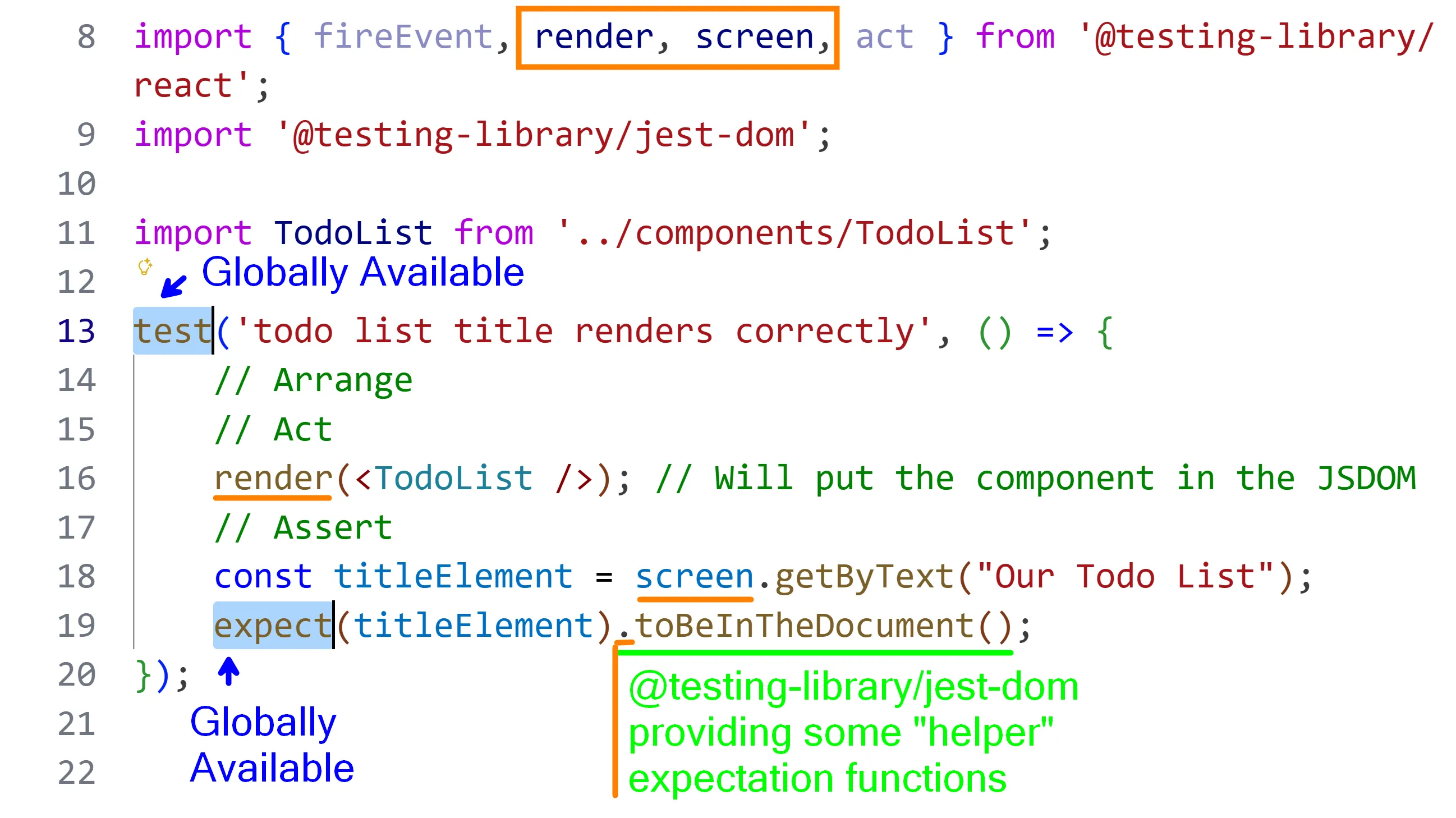
For this example, you can grab the following starter kit an apply it to your student workbook.
pnpm dlx tiged --disable-cache --force DG-InClass/DMIT-2008-A02-Sep-2025/sk/J/retry-testing-components ./src/J/retry-testing-componentsIt uses an older version of NextJS/React and the accompanying test libraries are compatible with it. After downloading, remember to run npm install. You will also want two or three terminals (~/src/J/retry-testing-components) available as you walk through this example.
Terminal 1git commands | Terminal 2 Test Results | Terminal 3 Running App |
|---|---|---|
| commits | npm run test:watch | npm run dev |
Note: When you run npm run test:watch, you will see the following in the terminal because we don’t have any unit tests (yet).
No tests found related to files changed since last commit.Press `a` to run all tests, or run Jest with `--watchAll`.
Watch Usage: Press w to show more.
Todo List Component
Section titled “Todo List Component”In-Class Demo Jan 2026 term
Complete Code
import {fireEvent, render, screen, act} from '@testing-library/react';import '@testing-library/jest-dom'
import TodoList from '../components/TodoList'

test('todo list title renders correctly', ()=> {  render(<TodoList />)  const titleElement = screen.getByText("Our Todo List")  expect(titleElement).toBeInTheDocument()})

test('todo list button renders correctly', ()=> {  render(<TodoList />)  const titleElement = screen.getByText("Add Todo")  expect(titleElement).toBeInTheDocument()})
test('todo is added successfully', ()=> {
  render(<TodoList />)  const inputElement = screen.getByLabelText("New Todo")  const buttonElement = screen.getByText("Add Todo")  const listElement = screen.getByTestId("todo-item-list")  const EXPECTED_STRING = "Learn Testing in Javascript"  // let's add the the string to our input element  fireEvent.change(inputElement, {    target: { value: EXPECTED_STRING}  })  // let's  expect(inputElement.value).toBe(EXPECTED_STRING)
  // act needs to be called when you update the state of the application.  // this is going to change the state of the allTodos in the component.  act(()=>{    buttonElement.click()  })  // the vlaue  expect(inputElement.value).toBe('')  expect(listElement).toHaveTextContent(EXPECTED_STRING)})
A TDD Example
Section titled “A TDD Example”We’re going to create a <Byline /> component from scratch, using TDD principles and practices. That means, we create the tests before we create the component.
-
Prep the test file with the testing library functions
tests/Byline.test.js // Importing some functions to help with testingimport { fireEvent, render, screen, act } from '@testing-library/react';import '@testing-library/jest-dom';It fails because we don’t have any tests. Let’s create a “stub” test.
test/Byline.test.js // Importing some functions to help with testingimport { fireEvent, render, screen, act } from '@testing-library/react';import '@testing-library/jest-dom';test('byline should include the author name', () => {// TODO: ... Complete this!}); -
Import the component we want to test.
test/Byline.test.js // Importing some functions to help with testingimport { fireEvent, render, screen, act } from '@testing-library/react';import '@testing-library/jest-dom';// Import componentimport Byline from '../components/Byline';Now it fails because that component does not yet exist. In fact, this will cause this whole test file to fail.
Terminal window FAIL tests/Byline.test.js● Test suite failed to runCannot find module '../components/Byline' from 'tests/Byline.test.js'The solution is to create a
<Byline>component. Notice that we are doing the absolute bare minimum to get the test to pass. Our focus is on creating the specifications of our component. With each specification, we then create the implementation, and at the end we will have just what we are looking for.components/Byline.js export default function Byline() {return <></>} -
Our first requirement is that the component render an author name.
test/TodoList.test.js test('byline should include the author name', () => {// TODO: ... Complete this!render(<Byline author="Dan Gilleland" />);const someElement = screen.getByText("by Dan Gilleland");expect(someElement).toBeInTheDocument();});Let’s try the bare-minimum to get the test to pass. We’ll hard-code the author name. 😱
components/Byline.test.js export default function Byline() {return <></>return <div>by Dan Gilleland</div>}That was just too easy, and obviously we would want the component to give the name we pass in as a prop. Let’s duplicate the test, but with a different author.
test/TodoList.test.js test('byline should include some other author name', () => {render(<Byline author="Stewart Dent" />);const someElement = screen.getByText("by Stewart Dent");expect(someElement).toBeInTheDocument();});Now it’s obviously failing because we had hard-coded the result. Time to switch it over to using the supplied
authorproperty.components/Byline.test.js export default function Byline() {export default function Byline(props) {return <div>by Dan Gilleland</div>return <div>by {props.author}</div>} -
Just to make sure that the author name is a required property, let’s prove that the component complains somehow that the author name is missing.
Notice that requiring the author name is a design decision. We could just as easily have put in an alternate expectation, such as having the author name default to
by Anonymousif none was supplied. -
Our next requirement is that the component include a link to the author’s GitHub account.
test/Byline.test.js // TODO: byline should// - include the github username// - element with the text "dgilleland"// - element.href = "https://github.com/dgilleland"components/Byline.test.js export default function Byline(props) {return <div>by {props.author}</div> -
Our final requirement is that the component include a link to the author’s website.
test/Byline.test.js // TODO: byline should// - include the github username// - element with the text "dgilleland"// - element.href = "https://github.com/dgilleland"// - include a link to the author's website// - element with the text "website"// - element.href = "https://gilleland.ca"// - element.target = "_blank"components/Byline.test.js export default function Byline(props) {return <div>by {props.author}</div>